On a development store, Shopify doesn't allow charges: you approve the plan as on any store, but it's a test charge and you pay nothing. In return, we translate up to 50,000 words, counting each language.
How it works
- Choose your languages and click “Translate my store”.
- Approve the plan in Shopify. In “Plan”, you see it as a test charge: “Test charge: Shopify does not charge development stores.”
- The first translation starts right away: you see it progress in minutes.
- In “Plan”, the ring counts your words against the 50,000 cap, counting each language.
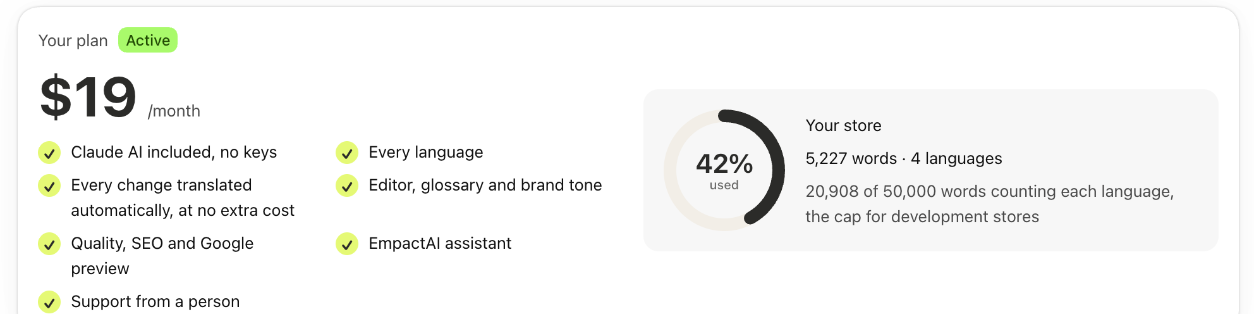
The 50,000-word cap
- Here, each language does count, unlike in the plans: your store's words times your languages, with a 10% margin. A store with 10,000 words and 3 languages is 30,000.
- If your store fits, you can translate again whatever you want. There's only a safety cap: 165,000 translated words in total, counting each language and every time something is translated again.
- If it doesn't fit, we translate up to the cap and the rest waits. “Home” tells you why.
- No trial cap: on a development store, only its 50,000-word cap applies, also during the 14-day trial.
- Canceling and activating the plan again doesn't reset the cap.
- The 5-product sample and the assistant don't use up the cap.
When the store is handed over to a client
- When the store moves to a paid Shopify plan, the test charge is no longer valid.
- The app asks for the real plan and pauses translation until it's approved.
- Once it's approved, the rest is translated. What's already translated stays as it is.
Good to know
- Development stores are the ones created from a Shopify Partner account, for example by agencies.
- What's already translated is saved in Shopify and stays in the store, also when it's handed over to the client.
- The store's words, without counting languages, decide the real plan it will need: How the price is calculated.