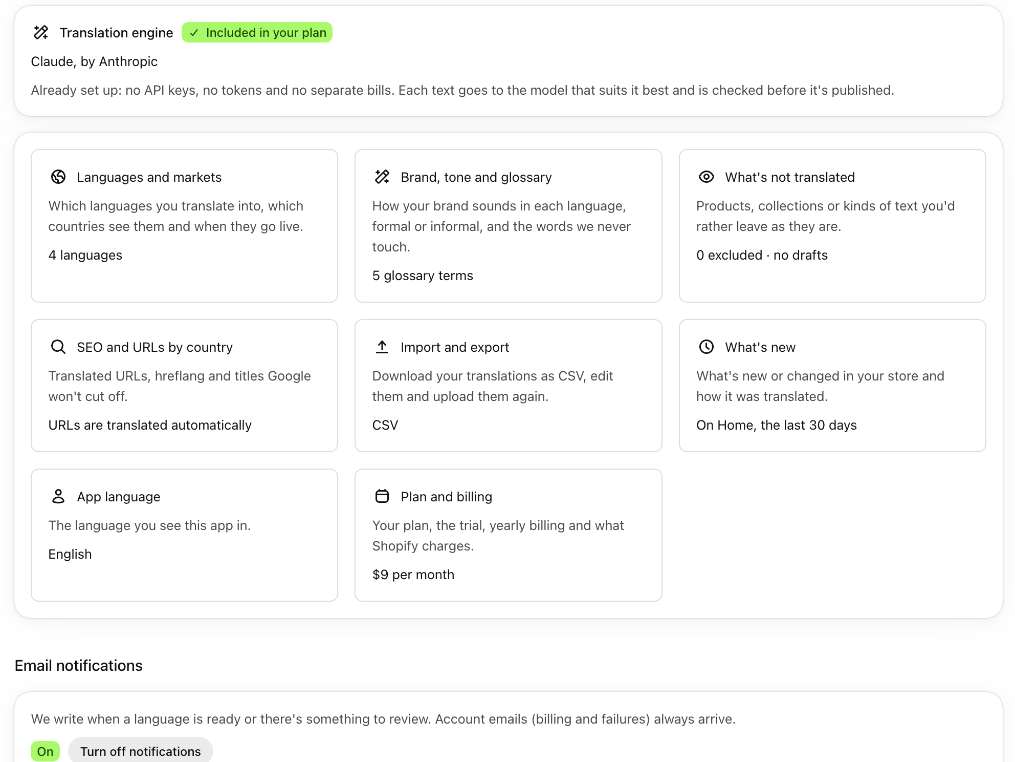
“Settings”, the last screen in the menu, brings together everything you can change in the app. Each card says how it's set now and takes you to the screen where you change it. At the top you see the translation engine, which comes already set up and included in your plan.
What's in “Settings”
- “Translation engine”: “Claude, by Anthropic”, with the “Included in your plan” tag. You don't have to enter keys or pay for the AI separately.
- One card per setting, with how it's set now:
- “Languages and markets”: how many languages you translate. It takes you to “Languages and markets”.
- “Brand, tone and glossary”: how many terms your glossary has. It takes you to “Brand and glossary”.
- “What's not translated”: how many products, collections and rules you've excluded, and whether drafts are translated.
- “SEO and URLs by country”: the translated URLs, the language codes for Google and the titles Google doesn't cut off. It takes you to “Quality”.
- “Import and export”: your translations in CSV.
- “What's new”: what's new or changed in your store in the last 30 days. You also see it on “Home”, in “Watching for changes”.
- “App language”: the language you see the app in. It takes you to “App language”, in “Brand and glossary”.
- “Plan and billing”: your monthly price, or “No plan yet”. It takes you to “Plan”.
- “Email notifications”, at the end.
Turn email notifications off or on
- Open “Settings” and scroll down to “Email notifications”.
- Check the status: “On” or “Off”.
- Click “Turn off notifications” or “Turn on notifications”.
The notifications are the welcome email, the one for a language ready to publish, the summary of texts to review and the summary every Monday. Your account emails, like the billing ones or one about a failure, always reach you. See The emails we send you.
Good to know
- The screens stay where they were: “Settings” is a way in, it doesn't replace them.
- Which AI translates your store: see The AI that translates your store.
- You can also turn off notifications with the unsubscribe link in those emails.