The AI reads your store's texts and tells you how your brand talks. It also suggests a tone so translations sound like you. Nothing changes until you decide to use it.
Steps
- Go to “Brand and glossary”. You can also get there from “Settings”, with the “Brand, tone and glossary” card.
- In “Show us how your brand talks”, click “Analyze my store with AI”.
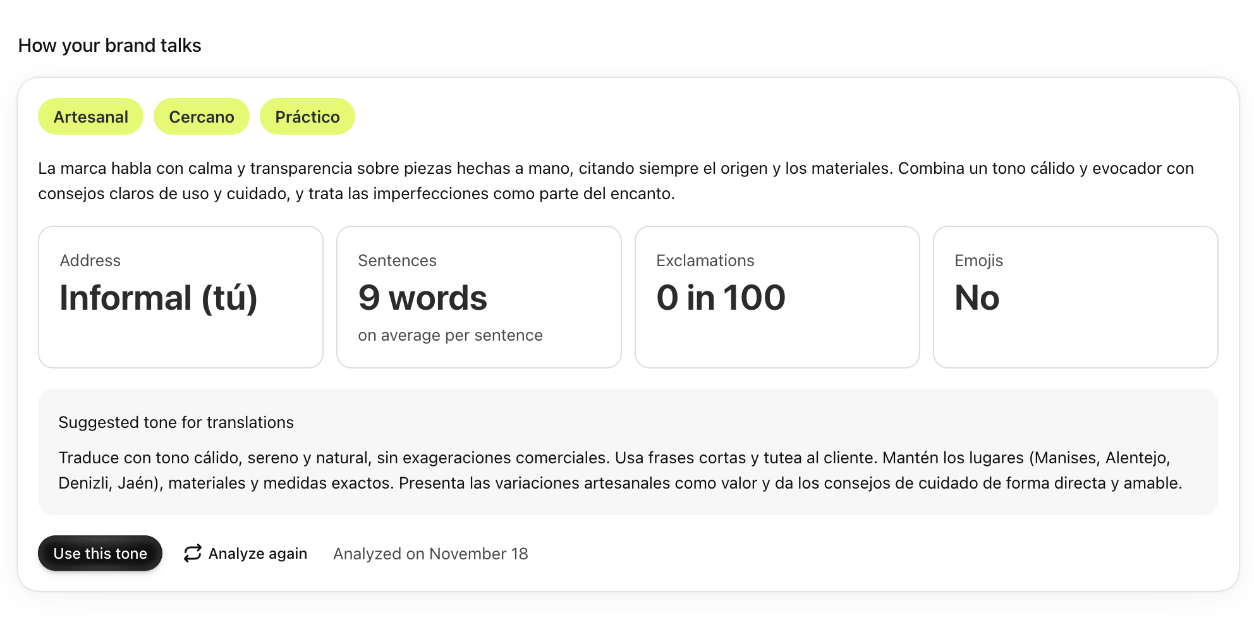
- When it's done, you see “How your brand talks”, with:
- three traits of your brand and a summary of how it sounds;
- “Address”: whether you speak to customers formally or informally;
- “Sentences”: how many words they have on average;
- “Exclamations”: how many there are in every 100 sentences;
- “Emojis”: whether you use them.
- Read the “Suggested tone for translations”.
- If you like it, click “Use this tone”. It goes into the “Your brand's tone” field, where you can adjust it.
Good to know
- The AI reads your store's description, the 15 products you changed most recently and 5 collections. If there are very few texts, it tells you.
- Sentences, exclamations and emojis are counted in your texts, without AI. Address is measured if your store is in Spanish; if not, it's taken from the suggested tone when the tone mentions it.
- You can repeat it with “Analyze again”, up to 5 times a day. The date of the last analysis shows next to it.
- When the suggested tone is the one you use, you see “It is your current tone”.
- The tone applies to every language. Formal or informal address is chosen separately for each language: Formal or informal address in each language.
- As long as you have no tone and haven't analyzed your brand, “Things to do”, on “Home”, reminds you with “Analyze my tone”.