Each language has a score from 0 to 100 in “Quality”. It measures what a customer sees in that language: whether it's translated, published and open in its markets, whether the SEO fits in Google and whether anything spoils it. Each thing that fails comes with its reason and a button to fix it.
How to read it
- Open “Quality”. If you translate several languages, choose one at the top.
- The score shows in the ring:
- with 90 or more, it's very good;
- from 70 to 89, it's good, with a few things to fix;
- below 70, there are important things to fix.
- Below, in “What we checked”, errors come first, then warnings and finally what's already fine.
- Click the button on each row: “Fix”, “See which” or “Open the theme”.
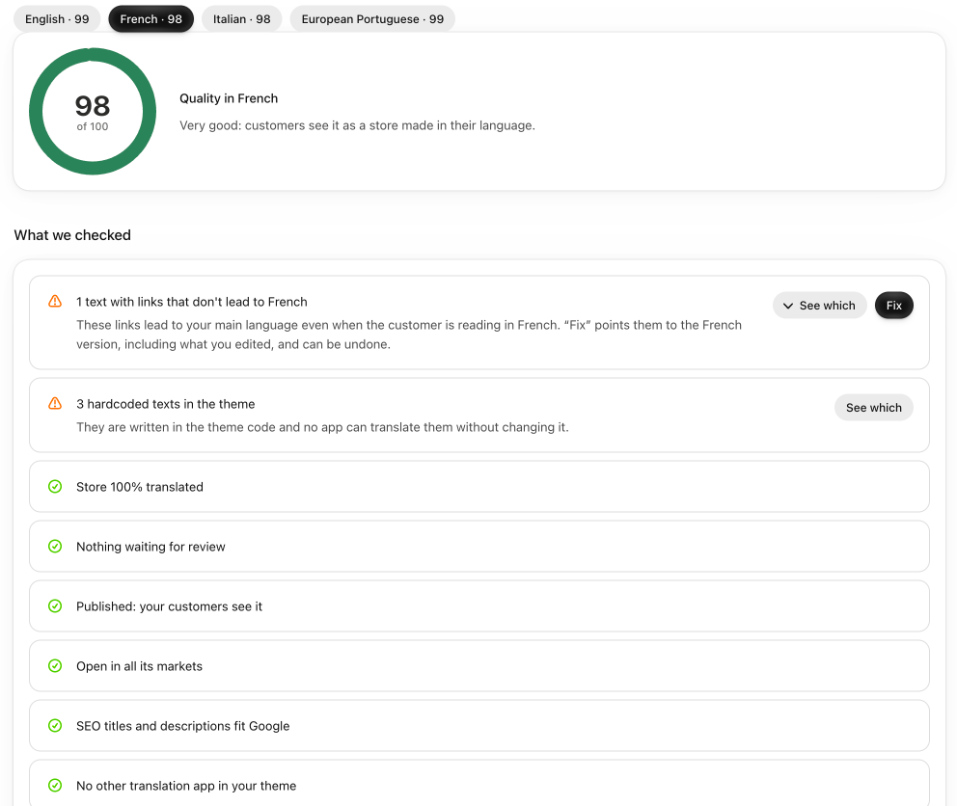
What counts and how much it weighs
- That it's translated: 45.
- That there are no texts waiting for your decision: 15.
- That it's published: 10. It only counts once the language is at 95% or published.
- That it shows in the markets that speak that language: 10.
- That SEO titles and descriptions fit in Google: 10.
- That the links in your texts lead to that language: 5.
- That the theme has no hardcoded texts: 5.
- That there's no other translation app in your theme: 5.
- That nobody is changing your translations from outside: 5.
The score is the average of what's met, weighted by how much each thing weighs. What can't be known yet doesn't count.
Good to know
- It's calculated when you open “Quality”, with the data at that moment. The theme is checked at most once a day.
- On “Home”, the “Quality” card shows the average of your languages. If one drops below 90, it shows in “Things to do” with “See what is wrong”.
- Hardcoded theme texts take off little, because they aren't a translation error. See Hardcoded theme texts.
- This score is per language. Each country's score is a different one and looks at more things: How ready each country is.