Shopify adds tags to your store that tell Google the language of each version and which country it's for (they're called hreflang). It adds them on its own, based on the published languages of each market. The app checks them and tells you if a country is missing its language or shows one that nobody there searches in.
Where you see it
- Open “Languages and markets” and scroll down to “Your markets”.
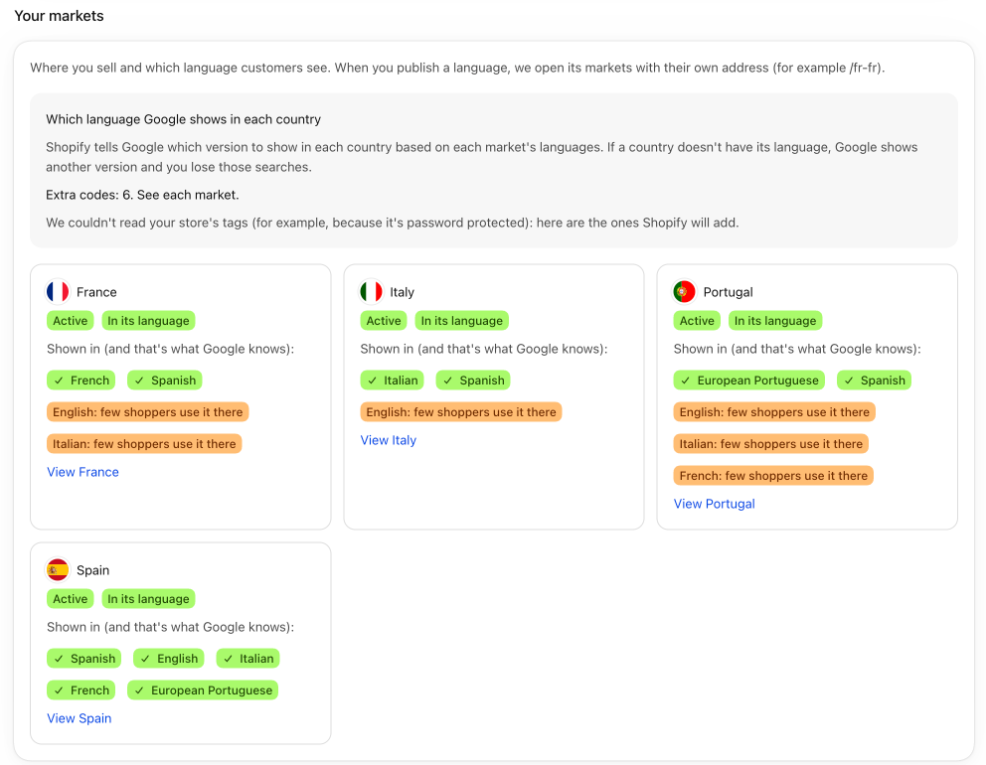
- At the top, the “Which language Google shows in each country” box sums up what we found. If everything is fine, it says “All good: every market shows in its countries' language.”
- On each market card, the Google line shows the languages for that country:
- with a check mark, the ones that are fine;
- with a warning that it's missing, a language its countries speak that the market doesn't show;
- with a warning that nobody there searches in it, a language its countries don't speak.
- If you hover over a language, you see the code Google gets, for example
fr-FR.
Fix a missing language
- If the app doesn't translate that language yet, the market card has a button to add it. See Add a language.
- If it already translates it but it isn't published, the card says it will show once you publish it. See Publish a language.
- If it's published and the market doesn't show it yet, the card has a button to show the market in that language. The app opens it with its own address, for example
/fr-fr.
Good to know
- Your store's main language is never extra: it's the one every market shows if it doesn't have its own.
- The warning about a language nobody searches in only shows in markets with their own address (a subfolder or a domain). It's a warning, not an error. If nobody in that country buys in that language, you can remove it from the market in Shopify's market settings. If you want to keep it as an option for your customers, leave it.
- The app also reads the tags on your store's home page. If it finds codes that don't come from your markets, it tells you: they usually come from the theme or another app, and they confuse Google.
- If your store has a password, the tags can't be read. In that case we show you the ones Shopify will add.
- The app doesn't add these tags or touch your theme: Shopify adds them.