A Shopify market is a country, or a group of countries, where you sell. When you publish a language, the app opens it in the markets whose countries speak it, each with its own address: for example, /fr-fr for France. It doesn't remove any language the market already had.
What the app does when you publish a language
- It adds it to your main address, with its prefix: for example,
/fr. - For each market whose countries speak it and that doesn't have its own address yet, it creates one: the language and the country, like
/fr-fr. - At that address, the new language shows by default. Your main language and the ones the market already showed stay as options: in France, for example,
/es-frand/en-fr. - It checks once what doesn't fit in that country and leaves the suggestions for you in “To review”.
See how each market is doing
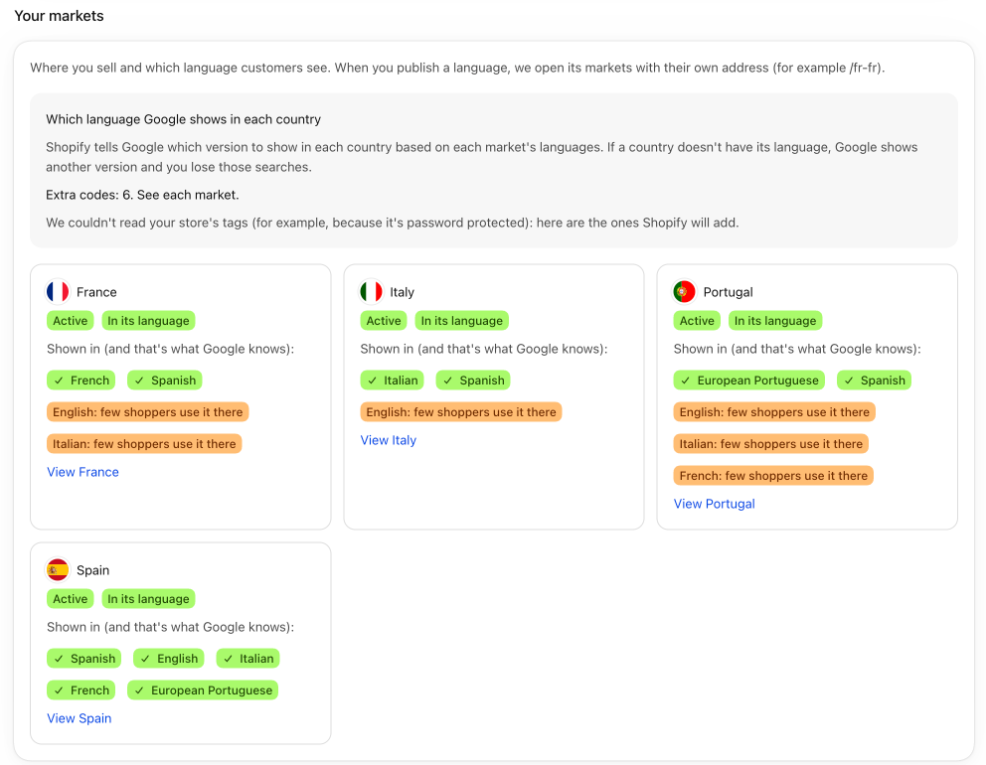
- Open “Languages and markets” and scroll down to “Your markets”.
- Each card says whether the market is “Active” or “Inactive” and how it shows:
- “In its language”: it already shows in its countries' language.
- “Not open in its language yet”: the language is published, but the market still shows in your main language. Click the card's button to show it in its language.
- “Not in its language”: you don't translate that country's language yet. The card has a button to add it.
- Below, you see which languages the market shows in and what Shopify tells Google.
- The link at the end opens the country's page, with how ready it is to sell.
Good to know
- Shopify only lets a market show a published language. That's why the order is translate, publish and open.
- If the market already has its own address (a subfolder or a domain you created in Shopify), the app doesn't change it. To add a language to it, do it in Shopify's market settings.
- Markets without their own address use your main address and show its languages.
- The links in your texts go to the address of the customer's market, so they don't leave their country. See Links that go to each language.
- Which version Google shows in each country: see Which language Google shows in each country.
- Each country's score: see How ready each country is.